Apple iOS 26: Overview The Revolutionary Liquid Glass Design and Apple Intelligence

The launch of iOS 26 marks a groundbreaking turn in Apple’s smartphone operating system, not just with a large number of new intelligent features but with a bold and completely new visual transformation known as Liquid Glass. This update converts the iPhone interface into a dynamic, luminous backdrop that reflects and transforms light, creating a living, tactile experience that’s a first of its kind in smartphone experience. Alongside this alluring design, iOS 26 includes advanced Apple Intelligence powered by AI to make everyday tasks more efficient and enhance communication with smoothness.
In this blog, we’ll dive deep into the Liquid Glass design and Apple’s intelligent features, revealing how this update redefines what an iPhone can do and how it looks. Especially for the Bangladeshi users
Which Phone Gets the New iOS 26?
Compatible iPhones: iPhone 11 Series and all models released after that, as well as the iPhone SE (2nd generation) and later.
The steps to get iOS 26:
- Go to Settings > General > Software Update on a compatible iPhone.
- Tap Download and Install.
Before updating, ensure your iPhone has enough storage space, is charged to at least 50% or plugged in, and has a stable Wi-Fi connection. Backing up your device first is strongly recommended.
What’s new on the iOS 26
A New Design: “Liquid Glass”
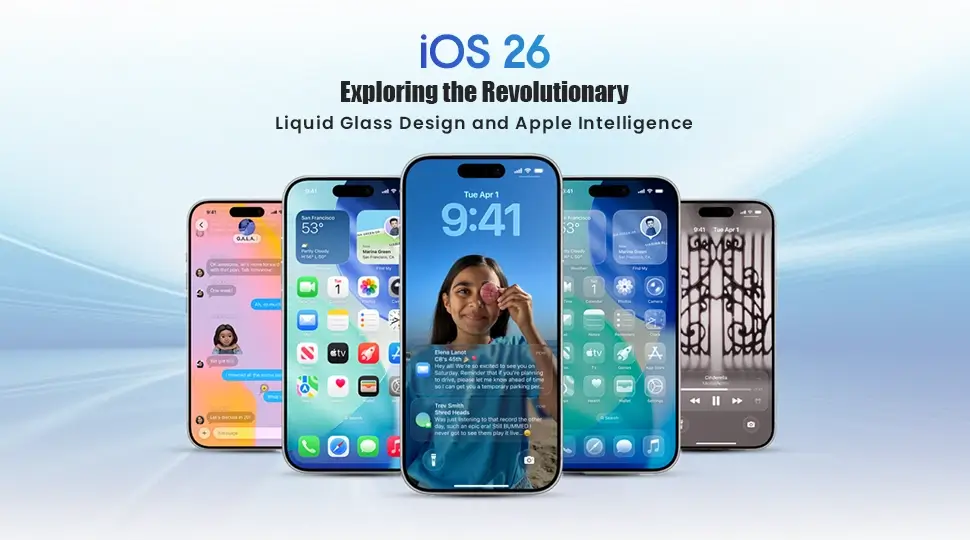
Apple has released its new Liquid Glass design, featuring a transparent, shiny experience that reflects light and responds to movement. It delivers a new, fluid experience to the Lock Screen, Home Screen, all of the apps, and the system as a whole. The app icons, buttons, and sliders will look and react as if they are made of real glass, with soft reflections and shadows that move based on how you move your device.
Apple Intelligence Gets Smarter
Apple Intelligence has become more integrated and more powerful. Real-time Live Translation within Messages, FaceTime, and Phone Calls makes multi-country communication easier.
With Visual Intelligence, users can recognize text or objects displayed on the screen, perform actions in real-time, and ask ChatGPT questions or search for details based on the on-screen objects or text.
New and Improved Apps
Messages has gained a host of new features including personalized backgrounds, AI-enabled group polls, and typing indicators for group chats. The Camera app has been completely redesigned to be more like a digital camera interface. The Phone app has also been redesigned, featuring a new interface that brings Calls, Voicemail, and Favorites together in a single portal.
What Is Liquid Glass Design?
Liquid Glass is the new visual language revealed by Apple for iOS 26, featuring a clearish, glass-like material across nearly every user interface component of the operating system. According to Apple, it states that liquid design is “a semi transparent material that interacts with light of mirror and deflects its surroundings, while dynamically transforming to help bring greater focus to content, delivering a new level of liveliness with vibrant energy across controls, navigation, app icons, widgets, and more.” Liquid Glass draws some inspiration from mixed-reality user interface approaches seen in products such as the Apple Vision Pro, and introduces various levels of depth, fluidity, and movement to the surface of the iPhone screen.
Key Features of Liquid Glass Design
Translucency and Light Play
Liquid Glass’s signature feature is its translucency. Here every UI element, from buttons, sliders, and toggles to sidebars and tab bars, has a bright and fluid quality that changes in response to surrounding lighting conditions and dynamics of the device. This ability introduces a layered visual effect to the interface and enhances the perception of depth for a more immersive experience. For example, apps showcase layered visuals and glow with their own luminosity as they react to the device motions such as screen tilting or shaking, adding animation to the home screen.
Dynamic and Fluid Interaction
Far more than visually attractive, Liquid Glass elements respond to user interactions with gentle flexes and ripples, similar to touching jelly or softly flowing water. This improves tactile feedback and creates a next level experience where controls seem to physically respond. Menus rapidly expand or contract, and toolbars float and fade according to usage context instead of staying fixed, optimizing screen real estate.
Customization Options
iOS 26 offers users to customize this glassy interface with diverse icon styles—clear, tinted, or more solid glass looks—and glassy widgets that integrate smoothly into backgrounds. The Lock Screen also wraps around this aesthetic with 3D photo wallpapers and glass-inspired typefaces that respond to light and motion for an ultra-modern feel. These visual prospers let each user create a unique iPhone presence.
Usability and Accessibility Considerations
While Liquid Glass is a significant jump in visual design, it has received both positive and negative feedback on usability. High transparency sometimes impacts on text and icon clarity , particularly when overlaid on photo backgrounds or complex wallpapers. Apple has solved this by implementing options to reduce transparency within Accessibility settings, giving users ability to to darken elements for clearer viewing without sacrificing the design’s elegance. This strategy balances innovation with practicality, guaranteeing features persists functional for all users.
Apple Intelligence in iOS 26: Smarter iPhone Experience
iOS 26’s Liquid Glass is visually impressive, however the core advantage lies on the deep integration of Apple Intelligence—powerful AI and machine learning capabilities—that truly elevates this update above the rest. This intelligence lifts the iPhone to a new height from a sleek device to a smart assistant made for your habits and needs.
AI-Powered Visual Intelligence
A key highlighted Apple Intelligence features is the AI-driven screenshot and photo analysis. iOS 26 can automatically detect objects, text, and context in images, enabling quick actions like web searches via Google or interacting with content through chatGPT powered AI Chatbots. This makes it easier for users to to turn information into actionable insights from visuals without any kinds of manual effort.
Developer Tools Enhanced by AI
Developers gain advantages from the seamless integration of AI directly into their toolset. Xcode 26 debuts an AI coding assistant that offers real-time suggestions, problem-solving, and code generation using large language models. With the help of the new Apple Intelligence APIs, these tools accelerate app development and allow for advanced apps that dynamically adjust to user context.
Live Translation and Language Processing
With real-time multilingual support, iOS 26 overcomes language barriers by introducing live translation to FaceTime, Messages, and phone conversations. AirPods allow for the private delivery of translation audio during conversations, and Apple’s on-device language models are capable of accurately identifying and translating a number of different languages. This invention is reshaping the landscape of international communication.
Predictive and Contextual Assistance
Additionally, Apple Intelligence allows adaptive notifications that reduce distractions by analyzing how and when you use your phone. This is actually a smart reminder that recommends tasks based on your context. An Apple Intelligencer based improved journal app with AI prompts to support observing emotions and life events. Siri is more proficient and aware of contexts than ever, responding to advanced questions with customized insights.
Privacy at the Core of AI Features
With iOS 26, Apple maintains its deep commitment to user privacy. Rather than relying on cloud servers, the majority of AI processing takes place right on the device. This empowers strong AI-driven features while guaranteeing that keeping private and sensitive data or information safe and secure. Users are satisfied by Apple’s strategy that their convenient functions and intelligence do not come at the expense of their data security and safety.
How to Customize iOS 26’s Liquid Glass Design
Getting the most out of the Liquid Glass design means exploring the customization options Apple has baked into iOS 26.
- Adjust Transparency: Visit Settings > Accessibility > Display & Text Size to reduce transparency for better clarity without losing the glassy effect.
- Choose Icon Styles: Customize app icons to be clear, tinted, or solid glass to best suit your wallpaper and visual preference.
- Glassy Widgets: Add widgets that complement the Liquid Glass theme for a cohesive home screen look.
- Lock Screen Effects: Personalize with 3D glass-inspired photos and dynamic typefaces that shimmer in harmony with device lighting.
These options allow users to balance aesthetic appeal and usability according to their needs.
The Future iOS 26 as a Foundation for Apple’s Ecosystem
iOS 26 goes beyond a redesign —it represents a new way of thinking to set up Apple’s ecosystem for future technologies. Its glass-like UI elements draw similar views to those seen in visionOS for Apple Vision Pro, indicating an integrated cross-device experience between phones, mixed reality headsets and other devices on the platform.
As AI becomes a deeper part of everyday use and development, iOS 26 creates the foundation for smarter apps and an overall frictionless, user focused personalized experience for the user. The operating system will continue to receive incremental updates, refining that experience further, broadening language support, improving AI insights, and adding more to the Liquid Glass aesthetics.
Conclusion
iOS 26 offers Apple one of the most ambitiously beautiful and intelligently capable updates. The Liquid Glass design transforms the iPhone interface into a responsive, transforming environment of translucence and motion while Apple Intelligence equips functions for augmented communication, productivity, and personalization.
For users, iOS 26 changes not only how the iPhone looks but how it behaves in reaching a fulfillment beyond sophistication and intelligence that compels users to interact and discover. For developers, there is excitement in creating apps that tap into contemporary AI capabilities and novel design constructs.
The time is now to upgrade to iOS 26 and the future notion of mobile software as not only a visual experience but one that is felt
FAQ
Which iPhone models support iOS 26?
iOS 26 is compatible with iPhone 11 series and all later models, including iPhone 12, 13, 14, 15, 16 series. Older models like iPhone XS or earlier won’t support it due to hardware requirements for Apple Intelligence features.
How do I install iOS 26 on my iPhone?
Go to Settings > General > Software Update on a compatible iPhone. If available, tap Download and Install. Ensure at least 50% battery (or plugged in), 5-6 GB free storage, and a stable Wi-Fi connection. Back up to iCloud first to avoid data loss risks.
What is Liquid Glass design in iOS 26?
Liquid Glass is iOS 26’s new visual language that makes UI elements (buttons, icons, widgets) semi-transparent like glass. It reacts to light, device motion, and surroundings for dynamic, fluid animations—inspired by Apple Vision Pro—making the screen feel alive and immersive.